User Guide
TAddressBook is a desktop app made for CS2030S Lab Teaching Assistants (TAs) to keep track of students’ lab assignments, optimized for use via a Command Line Interface (CLI) while still having the benefits of a Graphical User Interface (GUI).
If you can type fast, TAddressBook can get your lab management tasks done faster than traditional GUI apps.
- Quick start
- Feature List
- FAQ
- Command summary
Quick start
-
Ensure you have Java
11or above installed in your computer. -
Download the latest
TAddressBook.jarfrom here. -
Copy the file to the folder you want to use as the home folder for your TAddressBook.
-
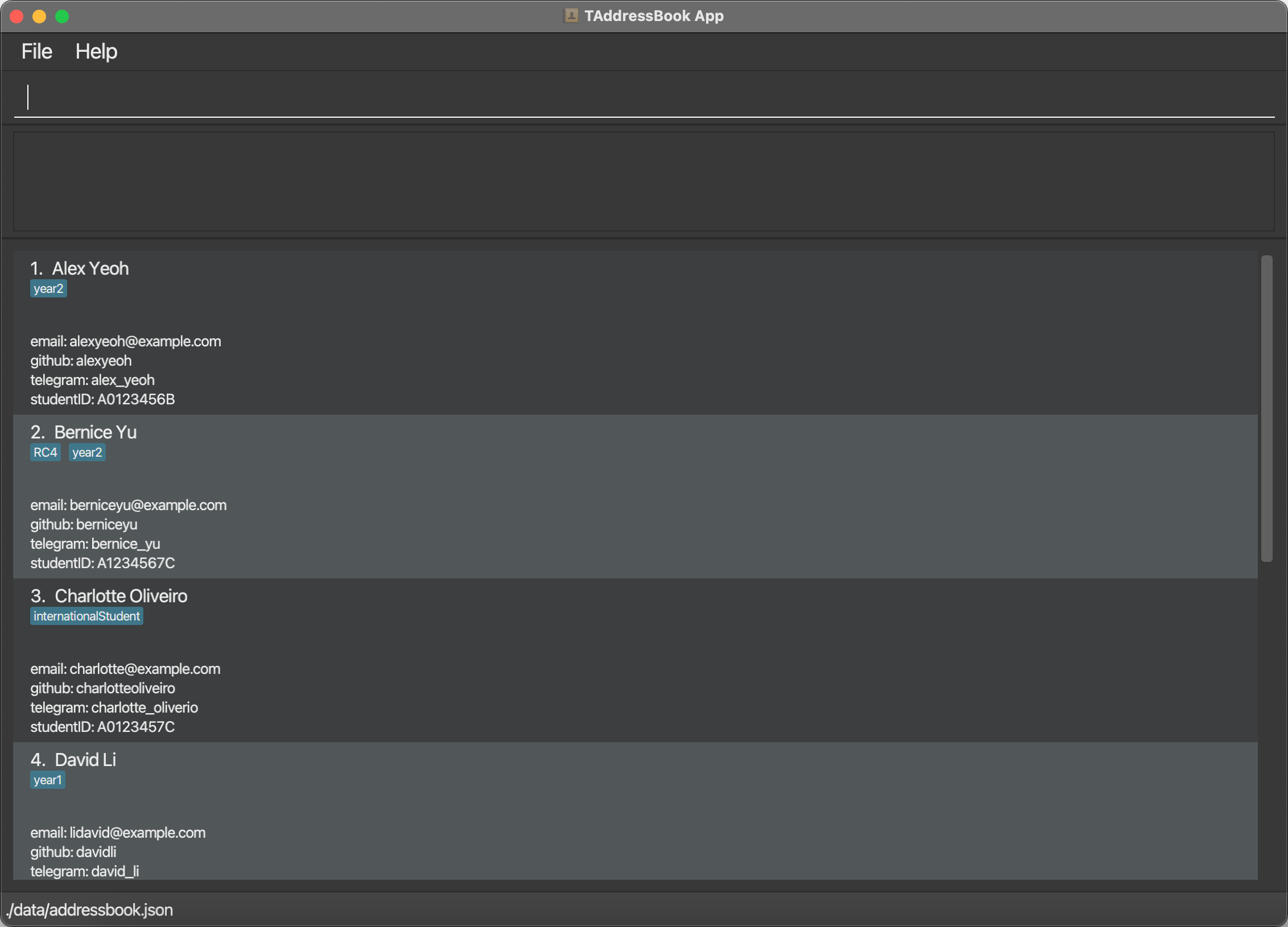
Double-click the file to start the app. A GUI similar to the image below should appear in a few seconds. Note how the app contains some sample data.
-
Type a command in the command box and press Enter to execute it. e.g. typing
helpand pressingEnterwill open the help window.
Some example commands you can try:-
list: List all students. -
addn/James Ho e/jamesho@email.com g/jamesH tl/jamesho i/A0123456T: Adds a student namedJames Hoto the TAddressBook. -
delete3: Deletes the 3rd student shown in the current list. -
clear: Clears all students. -
exit: Exits the app.
-
-
Refer to the Features below for details of each command.
Feature List
Things to note
 Notes about the command format:
-
Words in
UPPER_CASEare the parameters to be supplied by the user.
e.g. inadd n/NAME,NAMEis a parameter which can be used asadd n/John Doe. -
Items in square brackets are optional.
e.g.n/NAME [t/TAG]can be used asn/John Doe t/year2or asn/John Doe. -
Parentheses mean that at least one of the items in parentheses must be supplied.
e.g.(s/STATUS) (m/MARK)can be used ass/u,m/10ors/g m/10. -
Items with
…after them can be used multiple times including zero times.
e.g.[t/TAG]…can be used as ` ` (i.e. 0 times),t/12A,t/12A t/year2etc. -
Parameters can be in any order.
e.g. if the command specifiesn/NAME g/GITHUB,g/GITHUB n/NAMEis also acceptable. -
If a parameter is expected only once in the command but is specified multiple times, only the last occurrence of the parameter will be taken.
e.g. if you specifyi/A0000000J i/A1234567D, onlyi/A1234567Dwill be taken. -
Extraneous parameters for commands that do not take in parameters (such as
help,list,exitandclear) will be ignored.
e.g. if the command specifieshelp 123, it will be interpreted ashelp.
System-related features
Viewing help : help
Shows a message explaining how to access the help page.

Format: help
Exiting the program : exit
Exits the program.
Format: exit
Saving the data
TAddressBook data are saved in the hard disk automatically after any command that changes the data. There is no need to save manually.
Editing the data file
TAddressBook data are saved as a JSON file [JAR file location]/data/addressbook.json. Advanced users are welcome to edit that data file.
 Caution:
We recommend that users be extra careful when editing data of the
Caution:
We recommend that users be extra careful when editing data of the MasterLabList as well as any labNumber of individual Student’s Labs.If your changes to the JSON data file makes its format invalid, TAddressBook will discard all data and start with an empty data file at the next run.
If the data loaded is different from the data JSON, refer to FAQ Q2.
Student-related features
Adding a student : add
Adds a student to the TAddressBook with the provided attributes.
Format: add n/NAME e/EMAIL g/GITHUB tl/TELEGRAM_HANDLE i/STUDENT_ID [t/TAG]...
 Tip:
A student can have any number of tags (including 0).
Tip:
A student can have any number of tags (including 0).Tags must be a single word consisting of alphanumeric characters only.
Examples:
add n/James Ho e/jamesho@email.com g/jamesH tl/jamesho i/A0123456Tadd n/John Doe g/johnD e/johndoe@email.com tl/johndoe i/A0111111B t/year2
Listing all students : list
Shows a list of all students in the TAddressBook.
Format: list
Editing a student : edit
Edits an existing student in the TAddressBook.
Format: edit INDEX (n/NAME) (e/EMAIL) (g/GITHUB) (tl/TELEGRAM_HANDLE) (i/STUDENT_ID) (t/TAG)...
- Edits the student at the specified
INDEX.INDEXrefers to the index number shown in the displayed student list.INDEXmust be a positive integer 1, 2, 3, … - Existing values will be updated to the input values.
- When editing tags, the existing tags of the student will be removed i.e. adding of tags is not cumulative.
- You can remove all the student’s tags by typing
t/without specifying any tags after it.
Examples:
-
edit 1 g/johnedit e/johndoe@example.comedits the GitHub username and email address of the 1st student tojohneditandjohndoe@example.comrespectively. -
edit 2 n/Betsy Crower t/edits the name of the 2nd student toBetsy Crowerand clears all existing tags.
Locating students by name : find
Finds students whose names contain any of the given keywords. At least one keyword must be specified.
Format: find KEYWORD [MORE_KEYWORDS]
- The search is case-insensitive e.g.
hanswill matchHans. - The order of the keywords does not matter. e.g.
Hans Bowill matchBo Hans. - Only the name is searched.
- Only full words will be matched e.g.
Hanwill not matchHans. - Students matching at least one keyword will be returned (i.e.
ORsearch), e.g.Hans Bowill returnHans Gruber,Bo Yang.
Examples:
-
find JohnreturnsjohnandJohn Doe -
find alex davidreturnsAlex Yeoh,David Li
Deleting a student : delete
Deletes the specified student from the TAddressBook.
Format: delete INDEX
- Deletes the student at the specified
INDEX. -
INDEXrefers to the index number shown in the displayed student list. -
INDEXmust be a positive integer 1, 2, 3, …
Examples:
-
listfollowed bydelete 2deletes the 2nd student in the TAddressBook. -
find Betsyfollowed bydelete 1deletes the 1st student in the results of thefindcommand.
Clearing all entries : clear
Clears all entries from the TAddressBook, including all students and all labs.
Format: clear
Filter (by status of individual labs) : filter
Filters students based on the LabStatus of a specific lab.
Format: filter l/LAB_NUMBER s/LAB_STATUS
- Multiple filters can be applied cumulatively by executing the filter command multiple times.
Using the
listcommand clears all filters that are currently applied. -
LAB_NUMBERmust correspond to one of the labs currently in the TAddressBook. -
LAB_STATUSmust correspond to one of the following:-
UNSUBMITTED=u -
SUBMITTED=s -
GRADED=g
-
Example:
-
filter l/2 s/ureturns all students with a status ofUNSUBMITTEDforLab 2.
View student details : view
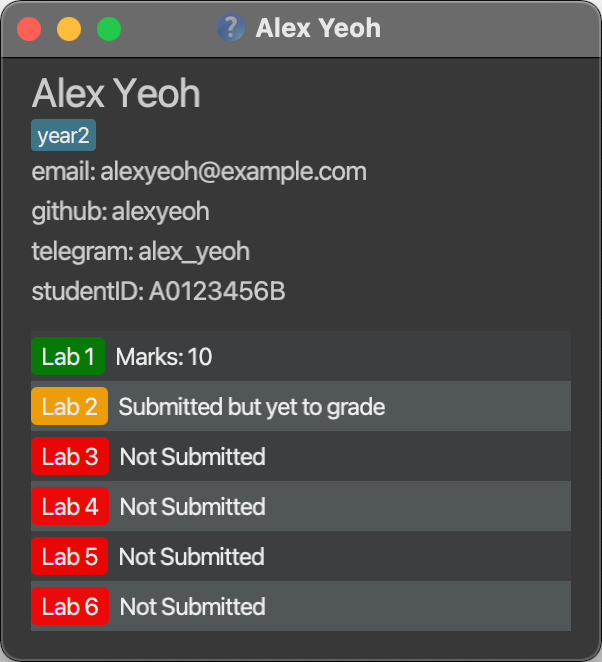
View a student’s details from the TAddressBook. This includes their personal information (i.e. email, GitHub username, etc.)
as well as the status and/or marks achieved for their labs. A sample result is shown below.
Format: view INDEX
-
INDEXrefers to the index number shown in the displayed student list. -
INDEXmust be a positive integer 1, 2, 3, …
Lab-related features
Adding a lab : labadd
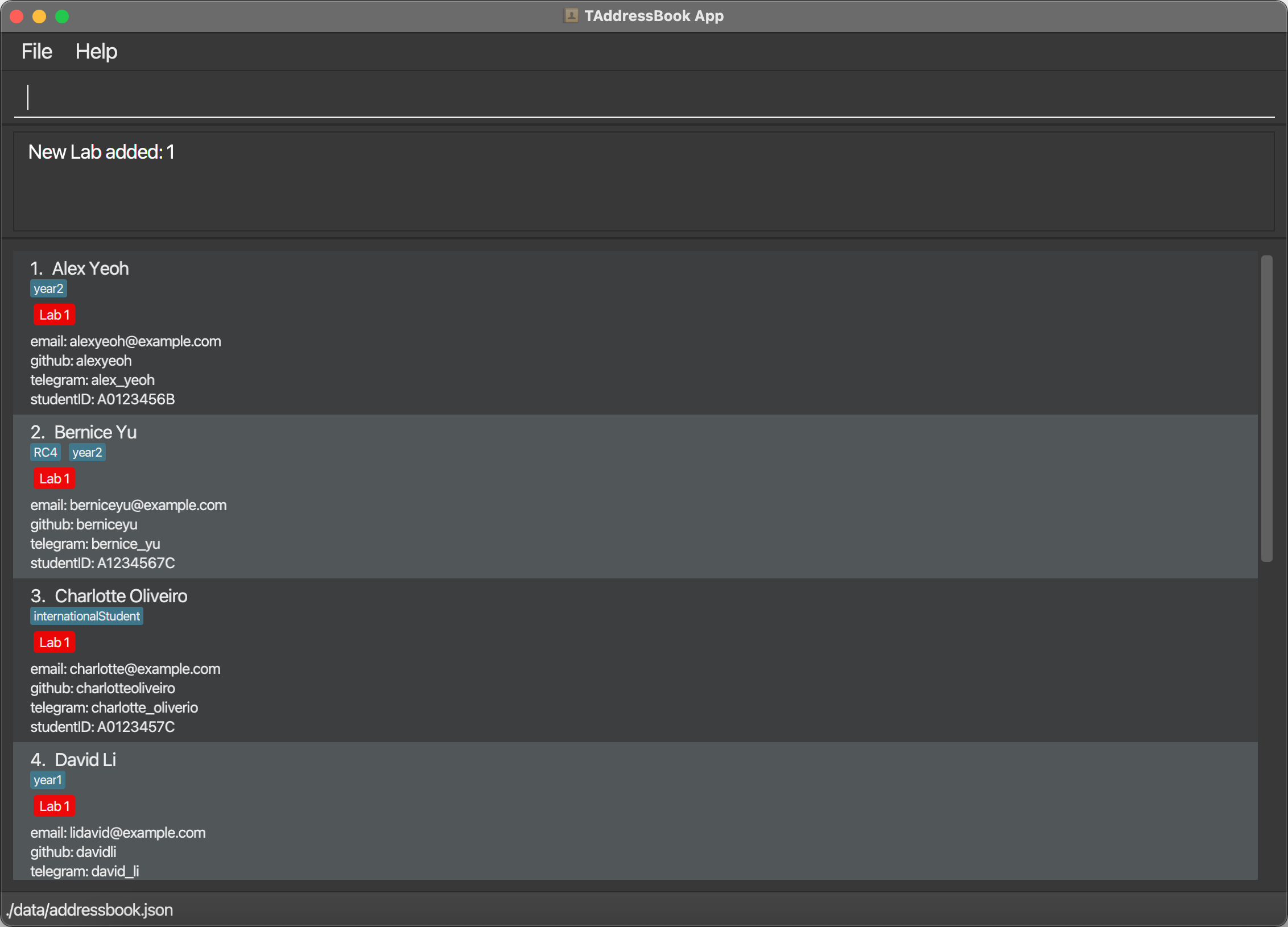
Adds a lab to every student. Shows up as a LabLabel on each student’s entry. By default, the LabLabel will be colored red for UNSUBMITTED.
The LabLabel is subsequently colored differently to represent different statuses:
-
UNSUBMITTED= red -
SUBMITTED= yellow -
GRADED= green
Format: labadd l/LAB_NUMBER
-
LAB_NUMBERmust be an integer between 0 and 20 inclusive. - Leading zeros will be ignored i.e.
l/00000012will be treated asl/12
After adding a new lab e.g. labadd l/1 you should see this
(assuming you did not already have Lab 1):
Submitting a lab : labsub
Changes the status of the specified lab for the student with the specified INDEX from UNSUBMITTED to SUBMITTED.
Format: labsub INDEX l/LAB_NUMBER
-
INDEXrefers to the index number shown in the displayed student list.INDEXmust be a positive integer 1, 2, 3, … -
LAB_NUMBERmust correspond to one of the labs currently in the TAddressBook.
Grading a lab : labgrad
Changes the status of the specified lab for the student with the specified INDEX to GRADED and records down the marks given for the lab.
Format: labgrad INDEX l/LAB_NUMBER m/LAB_MARK
- The current status of the lab to be graded can be either
UNSUBMITTEDorSUBMITTED. -
INDEXrefers to the index number shown in the displayed student list.INDEXmust be a positive integer 1, 2, 3, … -
LAB_NUMBERmust correspond to one of the labs currently in the TAddressBook. -
LAB_MARKshould be an integer between 0 and 100 inclusive. Note that leading zeros will be ignored i.e.m/00000012will be treated asm/12
Editing individual labs : labedit
Edits the status or marks of the specified lab for the student with the specified INDEX.
Tip:
labedit can achieve similar outcomes as labsub and labgrad, but using the latter commands would require less parameter inputs and thus be more convenient.
The main purpose of labedit is to allow for editing of wrongly provided information.
Format: labedit INDEX l/LAB_NUMBER (s/LAB_STATUS) (m/LAB_MARK)
-
INDEXrefers to the index number shown in the displayed student list.INDEXmust be a positive integer 1, 2, 3, … -
LAB_STATUSmust be one ofu/s/g(UNSUBMITTED/SUBMITTED/GRADED). -
LAB_MARKshould be an integer between 0 and 100 inclusive. Note that leading zeros will be ignored i.e.m/00000012will be treated asm/12 - Only valid combinations of
LAB_STATUSandLAB_MARKwill be accepted.- If
LAB_MARKis provided, there is no need to provideLAB_STATUS.
However, if provided,LAB_STATUSmust beg. - If
LAB_STATUSisuors,LAB_MARKcannot be provided.
- If
Removing a lab: labrm
Removes a specified lab from every student in the TAddressBook.
Format: labrm l/LAB_NUMBER
-
LAB_NUMBERmust correspond to one of the labs currently in the TAddressBook.
FAQ
Q1: How do I transfer my data to another Computer?
A: Install the app in the other computer and overwrite the empty data file it creates with the file that contains the data of your previous TAddressBook home folder.
Q2: Why is the data loaded different from my data JSON?
A: Please note the following defensive behavior related to the data JSON file:
- All students will have their
LabListaligned with theMasterLabListwhen the data file is loaded in. This means that any labs that a student is missing will be added in with the defaultLabStatusofUNSUBMITTED. Any labs that the student has that is not in theMasterLabListwill be ignored. - If a student has a lab that has a missing or invalid
LabStatus, theLabStatusis set toUNSUBMITTED, orGRADEDif a validLabMarkis present. - If a student has a lab with a missing or invalid
LabMarkbut has aLabStatusofGRADED, it is loaded as anUNSUBMITTEDlab withUnknownmark.
If the TAddressBook starts up with blank data, but the user expects there to be data, it means that there are formatting issues in the data JSON due to editing by the user. In which case, if the user wants to modify the data JSON, the user should exit the app without using any commands that can modify data and restart the app after correcting the data JSON.
Command summary
| Action | Format, Examples |
|---|---|
| Help | help |
| Exit | exit |
| Add |
add n/NAME e/EMAIL g/GITHUB tl/TELEGRAM_HANDLE i/STUDENT_ID [t/TAG]... e.g. add n/James Ho e/jamesho@email.com g/jamesH tl/jamesho i/A0123456T
|
| List | list |
| Edit |
edit INDEX (n/NAME) (e/EMAIL) (g/GITHUB) (tl/TELEGRAM_HANDLE) (i/STUDENT_ID) (t/TAG)...e.g. edit 2 n/James Lee g/jamesHo
|
| Find |
find KEYWORD [MORE_KEYWORDS]e.g. find James Jake
|
| Delete |
delete INDEXe.g. delete 3
|
| Clear | clear |
| Filter |
filter l/LAB_NUMBER s/LAB_STATUSe.g. filter l/1 s/u
|
| View | view INDEX |
| Add lab | labadd l/LAB_NUMBER |
| Submit lab | labsub INDEX l/LAB_NUMBER |
| Grade lab | labgrad INDEX l/LAB_NUMBER m/LAB_MARK |
| Edit lab | labedit INDEX l/LAB_NUMBER (s/LAB_STATUS) (m/LAB_MARK) |
| Remove lab | labrm l/LAB_NUMBER |